



Reconciliation Wizard
The reconciliation wizard for training planning helps you identify all duplicate plannings for a measure/training course and reduce/consolidate them to the measure/training course you specify.
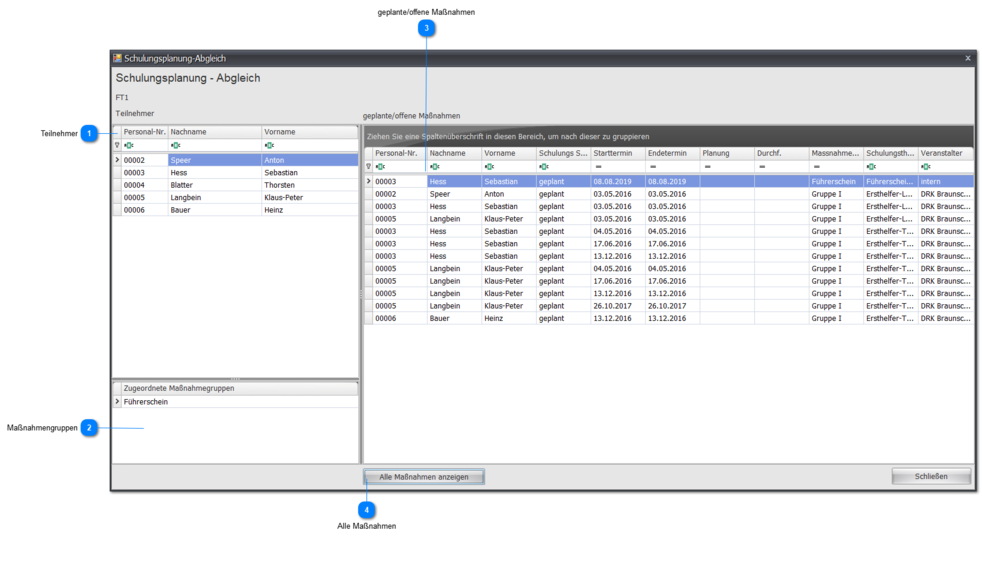
 Participants
All participants (excluding waiting list) assigned to this measure/training course (regardless of status) are listed here.
When an employee is marked, the view in the scheduled/open measures area is adjusted for this employee.
 Measure Groups
All groups/measure groups used for this measure/training course are listed here.
 Scheduled/Open Measures
Depending on the display/selection (individual participant or all participants), varying numbers of measures/training courses can be shown here in tabular form.
All measures/training courses listed here are always in conflict/competition with the currently selected measure/training course.
If you want to keep only the currently selected measure/training course as the sole measure/training course for a participant, you can delete the other measures/training courses via the context menu.
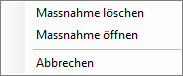
You will then no longer find the deleted measures/training courses in measures management.
 All Measures
Clicking the Show All Measures button sets the view in the scheduled/open measures area to all participants.
This shows all measures/training courses for all participants and for all measure groups.