



Tab "Q-Engine"
The preferences of the "Q-Engine" tab are as follows:
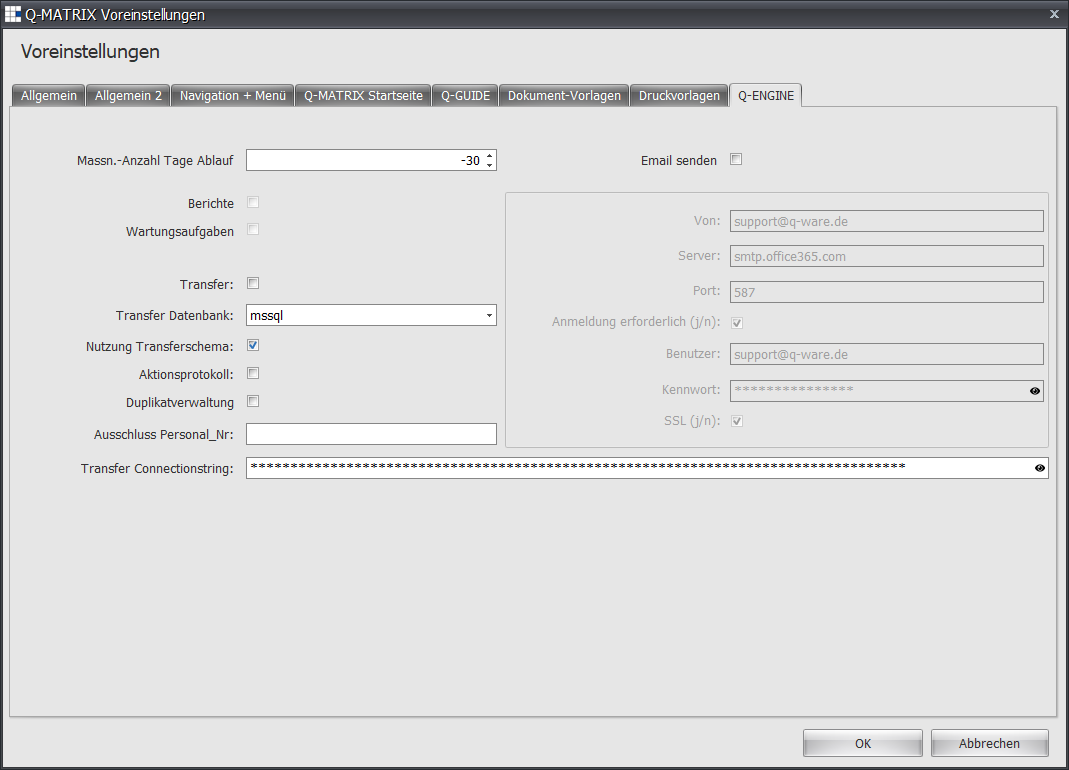
| Measure Days Until Expiry | Specify how many days before expiry of validity a measure should be marked as expired. | ||||||||||||||
| Reports | Currently non-functional | ||||||||||||||
| Maintenance Tasks | Currently non-functional | ||||||||||||||
| Transfer | If this function is enabled ( ), the rule for data transfer is applied ), the rule for data transfer is applied | ||||||||||||||
| Transfer Database | Specify here which database is the source. Currently Microsoft SQL and Oracle are supported. | ||||||||||||||
| Use Transfer Schema | If this function is enabled (), previously used duplicate settings are cached and restored for a new duplicate check. This provides user convenience by allowing settings made once to be reused for subsequent checks. | ||||||||||||||
| Action Log | If this function is enabled (), the transfer is recorded as a technical log entry in internal log tables. | ||||||||||||||
| Duplicate Management | If this function is enabled (), a check for duplicates is performed based on matching first and last names. | ||||||||||||||
| Exclude Employee No. | If certain employee numbers should not be changed/transferred during the transfer, you can specify here which employee numbers are excluded. Example: 9999 - All employee numbers starting with 9999 are excluded from the transfer | ||||||||||||||
| Transfer Connection String | Enter the connection string for the source database. | ||||||||||||||
| Send Email | If this function is enabled (), pending emails are sent by the Q-Engine. Your company's or provider's IT department can help you enter this data. The following settings are possible:
|