



Fonts Tab
In this tab, you can customize all fonts used, so headings or paragraphs match your preferences.
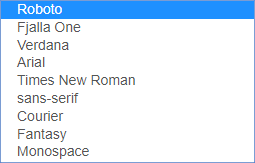
You can choose from the following fonts:
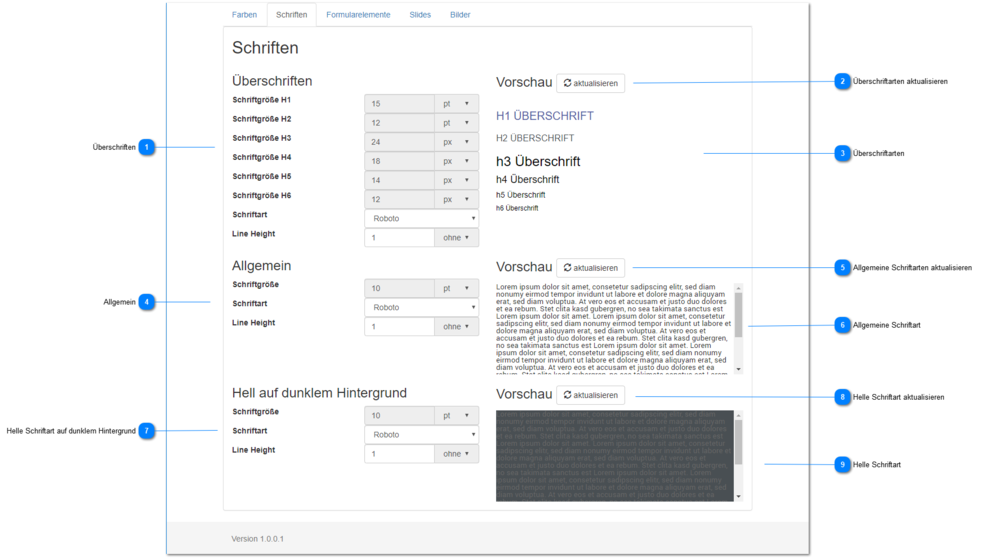
Headings
Set the font (default: Robot) and the line height (default: 1) for the heading sizes and types H1 - H6.
The size settings are currently disabled to maintain the Q-Guide user experience.
If you would like changes to these dimensions / settings, please contact us.
Update Heading Fonts
If the selected font is not shown to you in real time, you can update the heading type using this button.
Heading Fonts
Shows the selected font for the heading sizes and types H1 - H6.
General
Set the font (default: Robot) and the line height (default: 1) for the heading sizes and types H1 - H6.
The size settings are currently disabled to maintain the Q-Guide user experience.
If you would like changes to these dimensions / settings, please contact us.
Update General Fonts
If the selected font is not shown to you in real time, you can update the general font using this button.
General Font
Shows the selected general font.
Light Font on Dark Background
Set the font (default: Robot) and the line height (default: 1) for the heading sizes and types H1 - H6.
The size settings are currently disabled to maintain the Q-Guide user experience.
If you would like changes to these dimensions / settings, please contact us.
Update Light Font
If the selected font is not shown to you in real time, you can update the light font on dark background using this button.
Light Font
Shows the selected light font on dark background.