



Tab "Training Data"
The default tab contains the management of all essential elements for a measure.
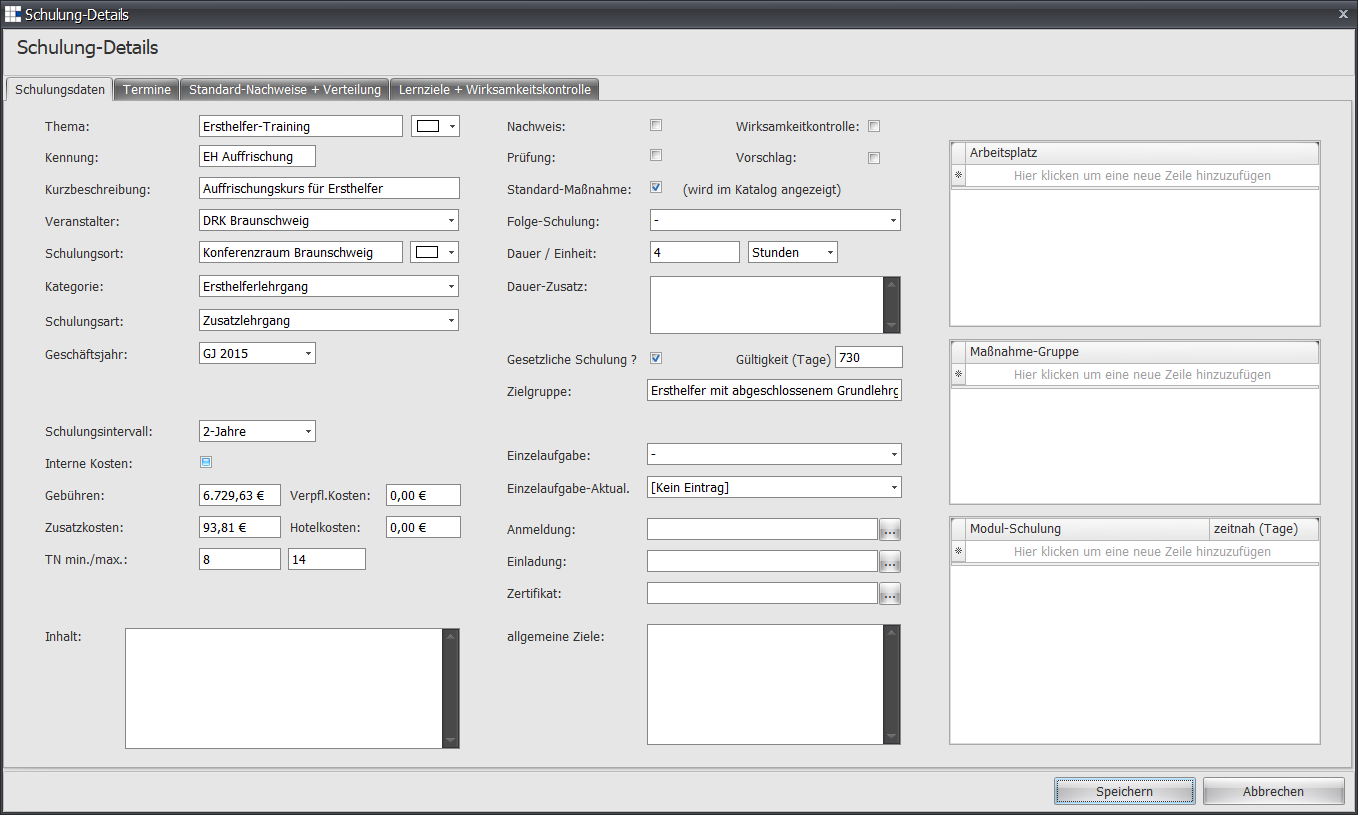
| Topic | Here you can change/enter the topic of the measure | ||||
| Topic (Color) | Define here which font color the measure should have in the training planning display | ||||
| ID | The identifier (a short code) of the measure. Assign a unique identifier so that you can quickly find/use the associated measure. | ||||
| Short Description | Here you can enter a description for the measure | ||||
| Organizer | Here you can select an organizer for the measure from the dropdown list | ||||
| Training Location | Enter the location of the measure here | ||||
| Training Location (Color) | Define here which background color the measure should have in the training planning display | ||||
| Category | Select a category for the measure | ||||
| Training Type | Select a type for the measure | ||||
| Fiscal Year | Assign a fiscal year if the measure/training is to be valid only once for a fiscal year | ||||
| Training Interval | Select an interval for the measure | ||||
| Fees | If you know the participation fees, you can record them here | ||||
| Additional Costs | If you know additional costs for participation, you can record them here | ||||
| Participants (Min./Max.) | For your internal measures/training courses, you can record the desired minimum and maximum number of participants. For example, you can use the minimum number to cancel the event with the trainer. The maximum number is often determined by the training room. | ||||
| Content | Here you can record the full content of the measure/training | ||||
| Evidence | If evidence is required, you can mark this here (small checkmark). You can set which documents are expected in the Standard Evidence tab. | ||||
| Exam | If an exam is required, you can mark this here (small checkmark). A measure/training with an exam always also requires an exam date for full completion. | ||||
| Standard Measure | If the measure/training is a standard measure, you can mark this here (small checkmark) | ||||
| Effectiveness Review | If an effectiveness review (i.e. a follow-up check) is to be conducted, you can set this here (small checkmark) | ||||
| Suggestion | If this measure is initially to be used only as an internal suggestion, you can set this here (small checkmark) | ||||
| Follow-Up Training | If you want users to be automatically reminded of a follow-up training/measure, select one of the already existing measures/training courses. This function lets you define precise sequences and successions of measures. For example, you can create possible onboarding sequences for new employees here. Note: There is currently no circular check. It is therefore possible to chain measures/training courses A through Z in a sequence and set A again as the follow-up training/measure at Z. | ||||
| Duration | Enter a number for the duration, for example 5 | ||||
| Time Unit | Select the time unit (day, days, hour, hours) of the measure | ||||
| Duration Note | If you want to add a note about the duration, you can use this field. For example: Overnight stay included in the participation fee | ||||
| Statutory Training | If this measure/training is a statutory training, you can mark this here (small checkmark) | ||||
| Validity Days | Note here, in days, the duration of validity, for example 365, 730, 1460 | ||||
| Target Group | Enter the desired target group, for example new employees, trainee, research and development | ||||
| Individual Task | Select one or more individual tasks from the dropdown list for this measure. As soon as an employee is assigned a position that includes this/these individual task(s) from this point on, you will automatically be asked whether you want to set up these training courses as unscheduled planning for the employee. Setting up such special training/measures is very rare. Note: Linking a measure/training to an individual task is to be understood as a very strict 1:1 relationship. Such special training/measures are only intended for employees who also have this individual task in their current primary position. If you want to assign this measure/training to an employee without this individual task, you will be alerted with a warning dialog. | ||||
| Individual Task Update | Indicates whether a defined individual task should be automatically updated in qualification level. This can raise the rating to the individual task's defined target level or to the maximum rating level | ||||
| Certificate | Here you can set a Word template for the certificate information, which is used instead of the generally configured certificate template from the defaults. | ||||
| General Objectives | In this field, note the objectives associated with this measure/training, for example more energy-efficient products | ||||
| Position | Select one or more positions from the dropdown list for this measure. As soon as an employee is assigned a position from this point on, you will automatically be asked whether you want to set up these training courses as unscheduled planning for the employee. Note: Linking a measure/training to one or more positions is to be understood as a very strict 1:1 relationship. If you want to assign this measure/training to an employee without this individual task, you will be alerted with a warning dialog. | ||||
| Measure Group | Select one or more groups for this measure from the dropdown list. A group is a collection of measures/training courses. There are two (2) different cases to distinguish:
| ||||
| Module Training | Here the modules for a master measure/training are defined: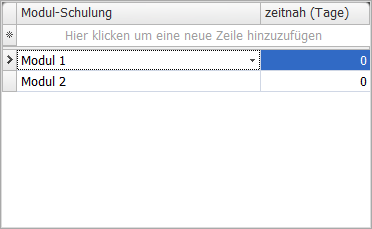
|