



General
The functions described here are active for all tabs and can be used.
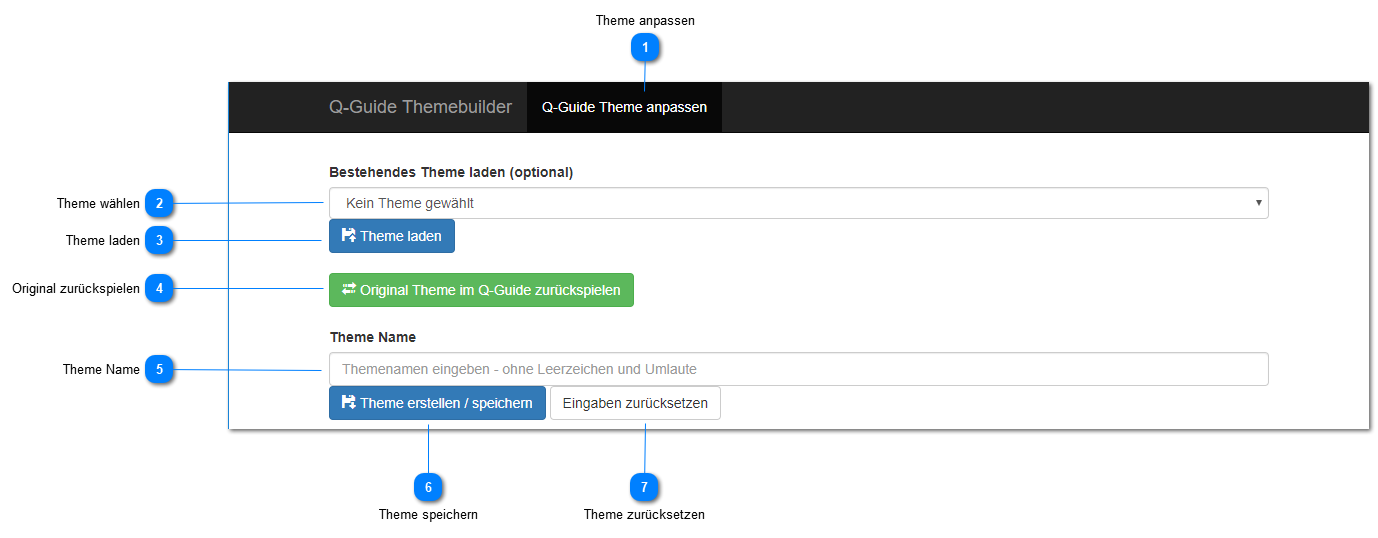
Adjust Theme
This button activates the current settings of the current template for the entire user interface.
If no template is selected or the name is empty, the current settings (default) are activated for the entire user interface.
From this moment on, the current settings are used for all Q-Guide users.
Select Theme
This drop-down list contains all available templates and can be selected with the left mouse button.
Afterwards, the saved setting can be loaded into the theme builder environment for all tabs using the Load Theme button.
Load Theme
Loads the template settings from the drop-down list into the theme builder environment.
Restore Original
Loads and activates the default template settings for the entire user interface.
From this moment on, the initial settings are used for all Q-Guide users.
Theme Name
Here you can enter a name for the template, for example Q-Ware_CorpID or Theme1
Save Theme
This button saves the current settings of all tabs under the name you chose for the template.
Reset Theme
Discards all current settings of all tabs and activates and loads the default template settings for all tabs.