



Basic Settings for Users
The following tabs are offered for the basic settings
"User" Tab
Allows editing of the user data
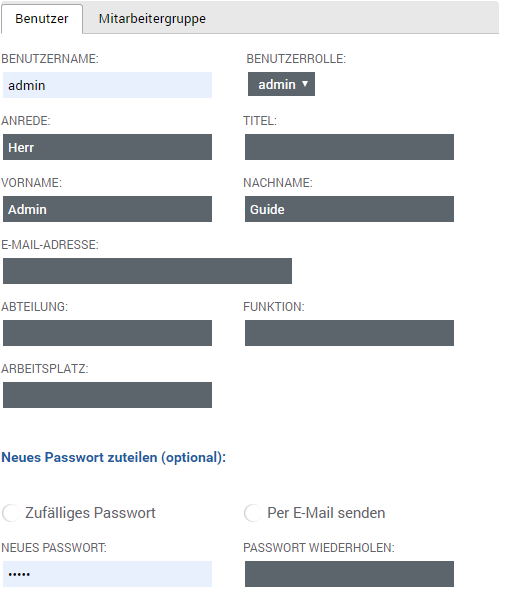
You can set the following user data:
| Username | This field contains the username for the user's login | ||||||
| User Role |
This field sets the user's role. A complete overview of the permissions can be found here. The following roles are available
| ||||||
| Salutation | Set the salutation for the user. If you do not assign a salutation, Mr. is automatically used and set. | ||||||
| Title | Set the title for the user, for example Prof. Dr. | ||||||
| First Name | Enter the user's first name here | ||||||
| Last Name | Enter the user's last name here | ||||||
| Email Address | Enter the user's email address here. Without an email address, not all functions and information are available to a user. | ||||||
| Department | Set the user's department here, for example Marketing or Public Relations | ||||||
| Function | Set the user's function here, for example Media Design | ||||||
| Workplace | Enter the user's workplace here, for example Press Officer |
In password management, you can assign a new password to the user at any time.
You can choose between a random password or one specified by you.
You can also specify whether the password should be sent by email or not.
The password is reassigned/set according to the settings you have made as soon as you click save as the action.
| Random Password | Enable ( ) this option to generate a random 8-character password, or disable ( ) this option to generate a random 8-character password, or disable ( ) this option so you can specify the password yourself in the New Password & Repeat Password fields. ) this option so you can specify the password yourself in the New Password & Repeat Password fields. |
| Send by Email |
Enable ( Your password for Q-Guide Username: %username% Password: %password% %publicurl% If you have any questions, please contact your internal point of contact. Support Phone: +49 5172 94 98 052 Email: [email protected] Your Q-Guide team |
| New Password | Enter here the password you want to assign to the user |
| Repeat Password | Repeat the password here and enter it again |
"Employee Group" Tab
Manage group membership
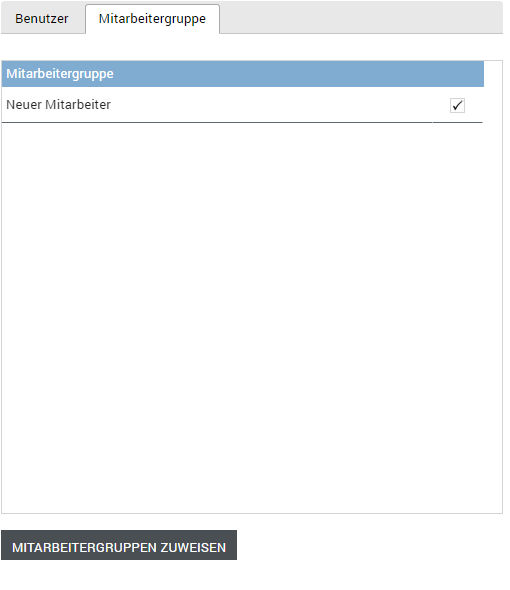
| Employee Group | Lists all available groups (default: not assigned to any group) |
| Selection | This column lets you select an employee group ( ) or not ( ) or not ( ). The selected row is also highlighted with a light blue background to indicate the selection. ). The selected row is also highlighted with a light blue background to indicate the selection. |
| Assignment | Assigns all selected employee groups to this user |