



Measure Details
In the measure details, you edit a measure's information, add proof, and define the required hours for the individual tasks to be covered by this measure.
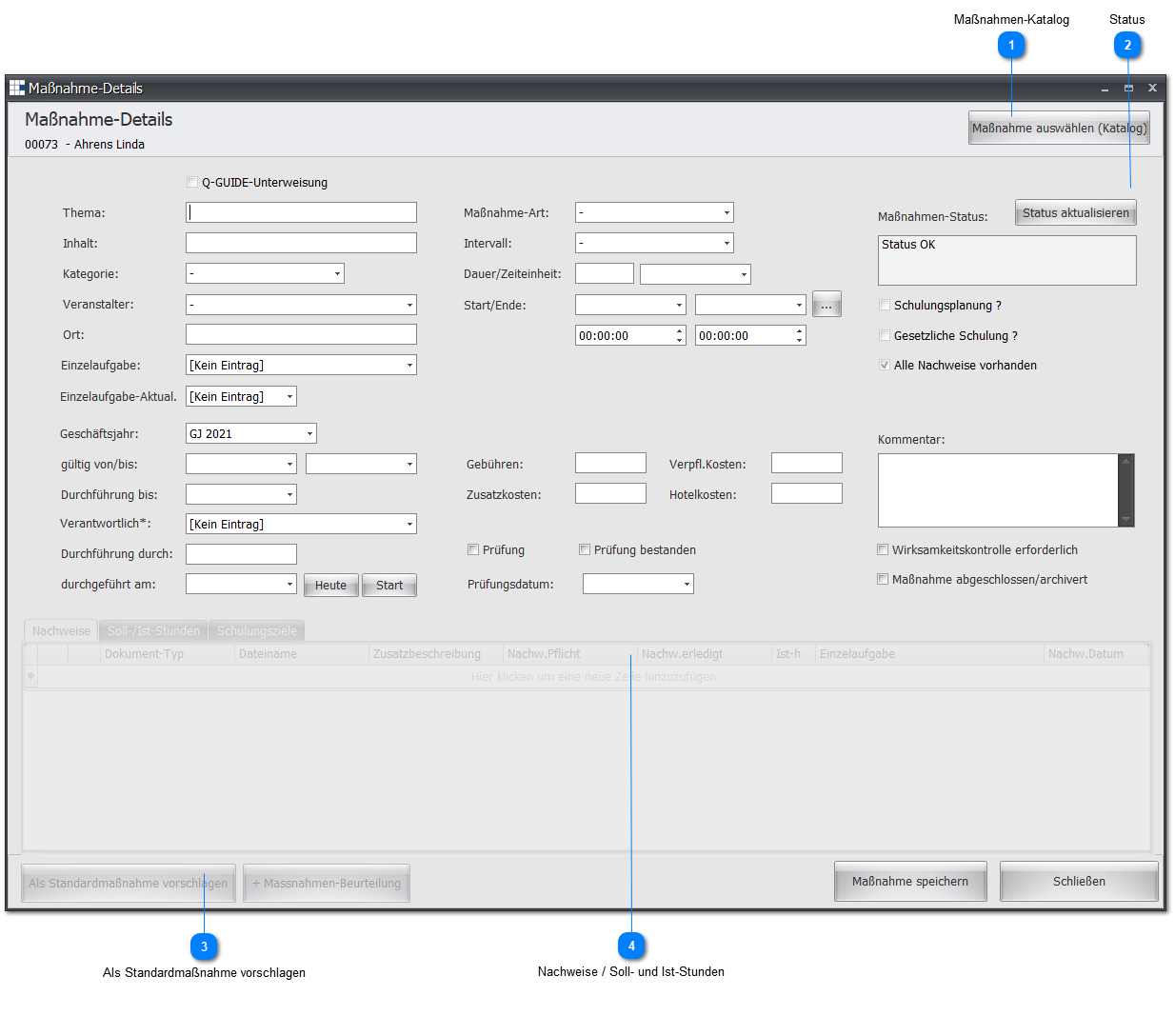
| Topic | Enter the topic of the training. |
| Content | A brief explanation of the measure content should be recorded here. |
| Category | What kind of measure is this? |
| Organizer | Specify the organizer of the measure. |
| Location | Enter the location where the measure takes place. |
| Individual task | Select which individual task this measure relates to. |
| Individual task update | Define how an update should occur (e.g. next level or target value). |
| Fiscal year | In which fiscal year will this measure take place? |
| Valid from/to | Shows the period during which this measure is valid. By default, this is the current fiscal year. |
| Due by | Date by which the measure should be carried out. |
| Carried out by | Specify the event leader (e.g. the speaker, the workshop leader). |
| Carried out on | Shows the date on which the measure was carried out. |
| Measure type | Is the measure, for example, a training course, a workshop, or an instruction session? |
| Interval | Sets the interval at which the measure becomes due again.
For example, this could be a measure that is repeated once a year. When an interval measure is completed, you will be asked whether a new measure should automatically be created for the next time interval. |
| Duration | Enter a whole number for the duration of the measure and define the time unit for it. |
| Time unit | Sets the time unit the measure takes up. |
| Start/End | Specify when the measure starts and ends. |
| Fees | Here you record the cost of the measure. Up to four cost groups are supported. These are:
|
| Test | Specify whether a test takes place after the measure. |
| Test passed | Check the box if there was a test and it was passed. |
| Test date | If there is a test for the measure, set the test date here. |
| Effectiveness check required | Check this box if an effectiveness check should be carried out after the measure is completed. |
| Assessment | Assess the success of the measure for the respective employee here. |
| Comment | You can add comments here as needed. |
| Measure completed/archived | This selection enables completing or archiving a measure. |
| Training planning? | Shows whether this measure can be managed via training planning. |
| Legally required training? | Shows whether this measure is legally required training. |
| Responsible | Shows who is responsible for this measure. |
 Measure catalog

This button opens the catalog of standard measures.
Select one of them to adopt its data for this measure.
 Status
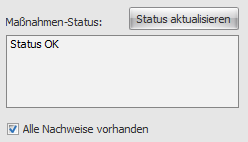
This field shows you the status of the measure.
It shows you, for example, whether there are still unfulfilled required hours or missing proof.
The "All proof provided" checkbox is enabled automatically once all specified proof is marked as provided.
 Suggest as a standard measure

If you have created a measure that should be carried out regularly or repeatedly, and which would therefore be ideal as a standard measure, use this to suggest adopting this measure as a standard measure into the measure catalog.
Suggestions must be processed by an administrator or someone from HR, since only they hold the necessary permissions.
 Proof / Required and Actual Hours
Proof:
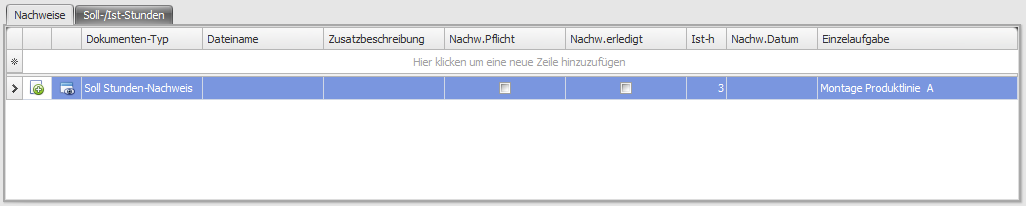
 | You can store scanned proof (provided it is in PDF format) directly.
This button opens a dialog window in which you select the desired PDF file and store it as proof. |
 | If a file is stored for a piece of proof, you can view it using this button. |
| Document type | Select what kind of proof this is (e.g. certificate of attendance, certification, etc.). |
| File name | Shows the file name of the file stored for this piece of proof. |
| Additional description | You can further define the proof here if needed. |
| Proof required | Specify whether the proof must be submitted ( ) or is optional. ) or is optional. |
| Proof completed | Check the box () if the employee has provided the proof. |
| Actual hours | How many hours did the employee spend obtaining this proof for the assigned individual task? |
| Proof date | Enter the date on which the proof was provided here. |
| Individual task | If the proof is to be assigned to an individual task, you can specify it here. |
Required/actual hours:

| Individual task | Specify an individual task here for which you want to define a number of required hours. |
| Required hours | Enter the number of required hours. |
| Actual hours | Shows how many hours the employee has already completed. This value is taken from the actual-hours value of the corresponding proof assigned to the desired individual task. |