



New User
Opens the input wizard for a new user. The data to be entered is identical to the manageable user data.
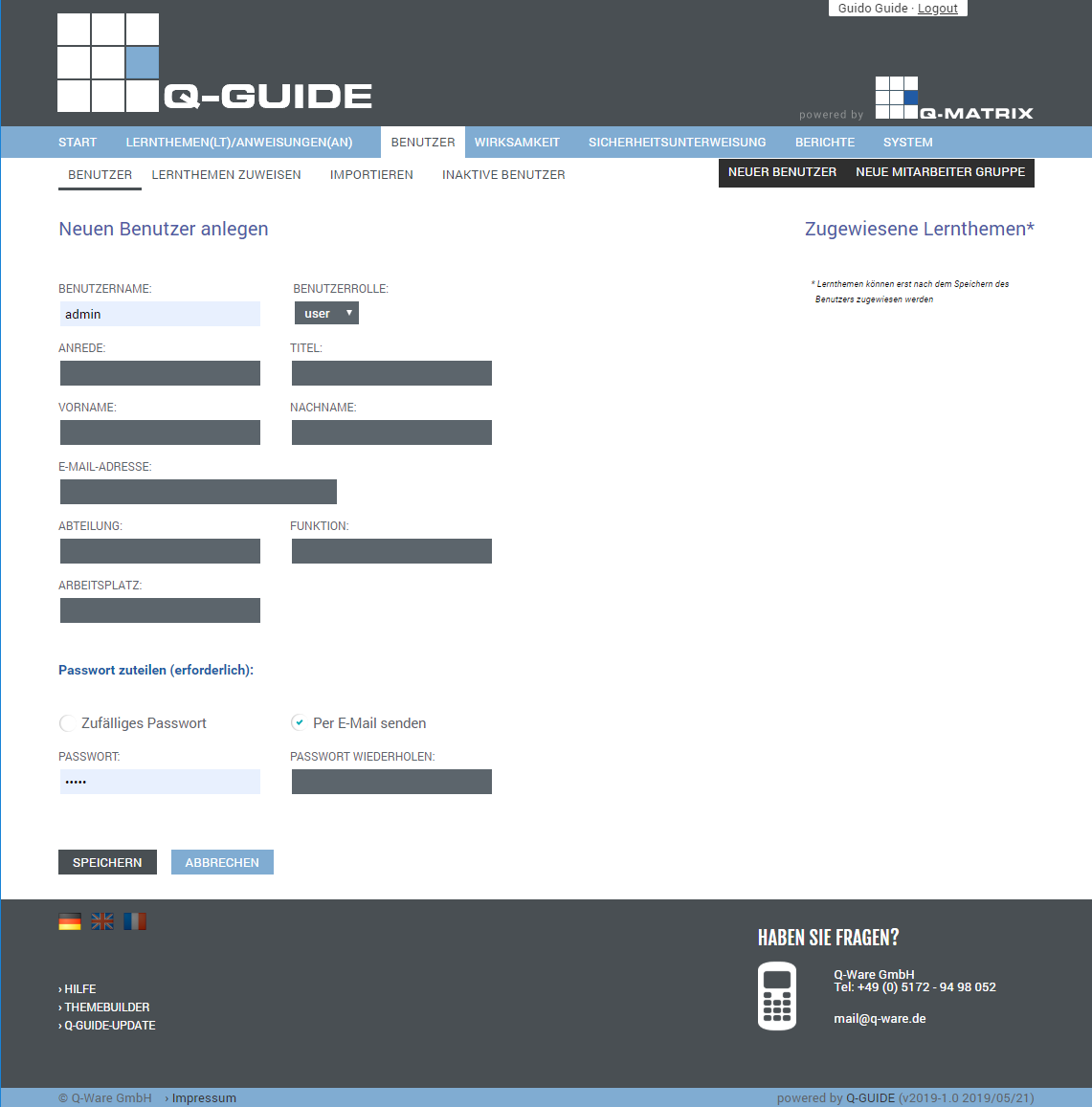
You can set the following user data:
| Username | This field is intended for the username used for the user's login. It is a required field and must be kept unique. | ||||||
| User Role |
This field determines the user's role. A complete overview of the permissions can be found here. The following roles are available
| ||||||
| Salutation | Set the salutation for the user. If no salutation is assigned, Mr. is automatically used and set. | ||||||
| Title | Set the title for the user, for example Prof. Dr. | ||||||
| First Name | Enter the user's first name here | ||||||
| Last Name | Enter the user's last name here | ||||||
| Email Address | Enter the user's email address here. Without an email address, not all functions and information are available to a user. | ||||||
| Department | Set the user's department here, for example Marketing or Public Relations | ||||||
| Function | Set the user's function here, for example Media Design | ||||||
| Workplace | Enter the user's workplace here, for example Press Officer |
In the password management section, you can assign a new password to the user at any time.
You can choose between a random password or one specified by you.
You can also specify whether the password should be sent by email or not.
Depending on the settings you have made, the password is reassigned/set as soon as you click Save as the action.
| Random Password | Enable ( ) this option to generate a random 8-character password, or disable ( ) this option to generate a random 8-character password, or disable ( ) this option so that you can specify the password yourself in the New Password & Repeat Password fields. ) this option so that you can specify the password yourself in the New Password & Repeat Password fields. |
| Send by Email |
Enable ( Welcome to Q-Guide from Q-Ware GmbH Hello %anrede% %name%, Under § 12 of the German Occupational Safety and Health Act, the employer must instruct employees at least once a year on safety and health protection at the workplace. We use the online learning and instruction portal Q-Guide to fulfill this obligation. The learning and instruction topics must be completed individually by you and, if applicable, concluded with a test. The test can be repeated multiple times within the prescribed period until passed. Once all questions have been answered correctly, the learning or instruction topic is considered passed and is valid for the specified period. Once this validity expires, you will receive an automatic notice that the learning or instruction topic must be worked through and completed again. The learning and instruction topics are generally to be completed during working hours. Please arrange a suitable time slot for this with your manager. You can access the online system as follows: URL: %publicurl% After your first login, you will be asked to change your password. Please observe the criteria required there for entering the new password. Please remember your new password carefully and generally protect it from unauthorized access by third parties. If you ever forget your password, you can request a new one at any time. By using Q-Guide, you agree not to share, reproduce, or alter its content with/for third parties. Please do not reply to this message, as it is an automatically generated email. If you have any questions, please contact your internal point of contact. Support Phone: +49 5172 94 98 052 Email: [email protected] Best regards Your Q-Guide team |
| New Password | Enter the password you want to assign to the user here |
| Repeat Password | Repeat the password and enter it again here |