



Configuration
You can make the following settings in the web.config file.
You can find this file in the installation directory, and elements not listed here must not be changed:
|
Contains the connection string for the Microsoft SQL Server. The following information must be set at minimum:
Examples: | ||||||
|
The value of value can be true or false. Default: false If true, it is checked at the first application start whether a database connection exists and can be used. Otherwise, a database connection wizard is activated. | ||||||
|
The value of value can be true or false. Default: false If true, Active Directory is used for login, and SSO (Single Sign On) is activated. To do this, the Microsoft Active Directory user must be entered in the user management under username and login name. Windows authentication must also be enabled in Internet Explorer (via GPO or manually on each PC): 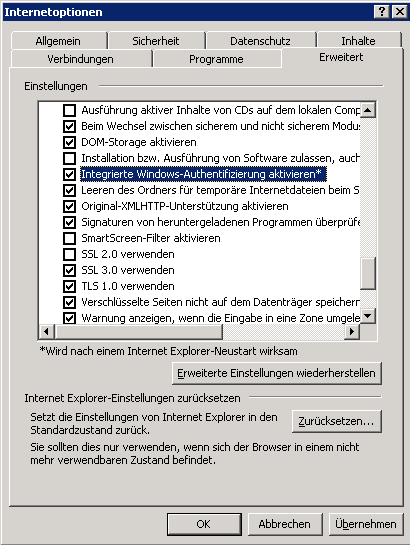
| ||||||
|
The value of value can be true or false. Default: false If true, it is checked at the first application start whether a database connection exists and can be used. Otherwise, a database connection wizard is activated. |