



Getting Started / Quick Start
This section is intended to help you find an easy way into Q-Matrix™.
You will learn how to represent your company in Q-Matrix™, how to carry out employee assessments, and how to create and manage training and development measures.
The overview for a quick start can be outlined as follows:
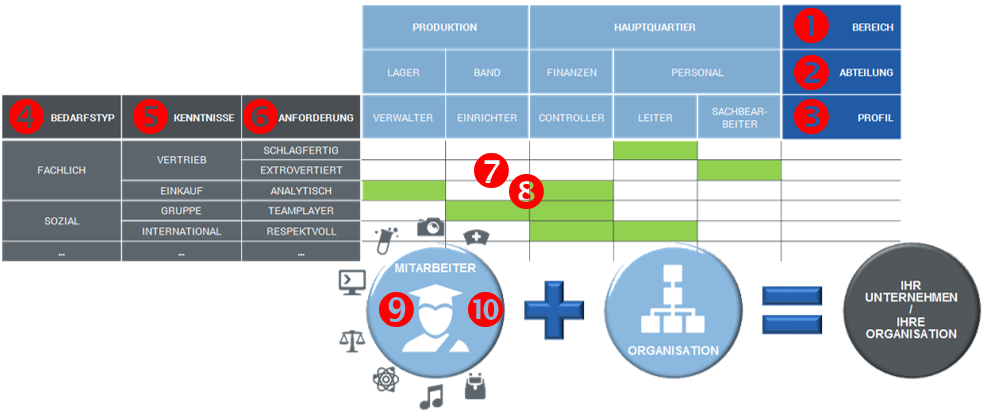
This sequence describes the steps needed for a quick start:
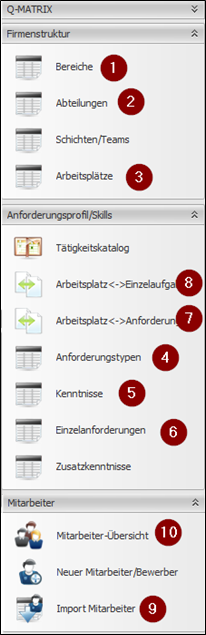 |
Define (01) Areas In this tab you will find an overview of your company's areas (e.g. management, sales, HR). Simply add a new record in the row marked with an asterisk (*). The short code is used for selection in the following steps. Create (02) Departments for the areas This table shows an overview of the work areas (e.g. accounting, IT, logistics). Create a new record in the row marked with an asterisk (*). The area is assigned in the "Area" field via a drop-down menu from the previous step. Create (03) Workplaces within the departments This tab shows an overview of the workplaces (e.g. controller, HR clerk). Create new workplaces in the row marked with an asterisk (*). The area and department are assigned in the "Work area" field via a drop-down menu, which adds the information from the selection into the corresponding fields. Determine (04) Requirement profiles For the qualification structure, this section provides an overview of the requirement profiles (e.g. professional requirements, technical requirements). New records are created in the row marked with an asterisk (*). Set up (05) Skills for the requirements This tab shows a skills overview (e.g. IT, finance, technical training). Add a new record via the row marked with an asterisk (*). The profile is assigned in the "Requirement profile" field via a drop-down menu from the previous step. Build up (06) Individual tasks for the skills This view leads you to an overview of the individual tasks (e.g. HR management software, asset management, MS Word). Create new individual tasks in the row marked with an asterisk (*). The profile and skill are assigned via the "Skill" field via a drop-down menu, which adds the information from the selection into the corresponding fields. Construct the (07) Task catalog Using the tool under "Workplace ◄► Requirement profile", you link the company structure to the requirement profiles. You can select any combination of individual tasks, skills, or requirements and assign it to the areas, departments, or workplaces using the buttons at the bottom of the tool window. You can also assign individual weightings to the combination you have created. Define (08) Qualification levels In the "Workplace ◄► Individual tasks" tab, you define the qualification levels of the individual tasks for a workplace. The weightings of the individual tasks can also be adjusted here. Import (09) Employees This guided dialog lets you import a CSV file with header rows. The import requires at least the following information: personnel number, first name, last name, email. Date of birth and start date can also be included. These are used for the graphical display on the Q-Matrix™ home page. Assign (10) Employees to workplaces The employees can now be displayed in an overview. In the list, you can assign each employee a primary workplace via the "Primary workplace" field. |